PDF Reader provides you multiple tools to quickly take control of your document while viewing a PDF. Here is a general overview of File Viewer:
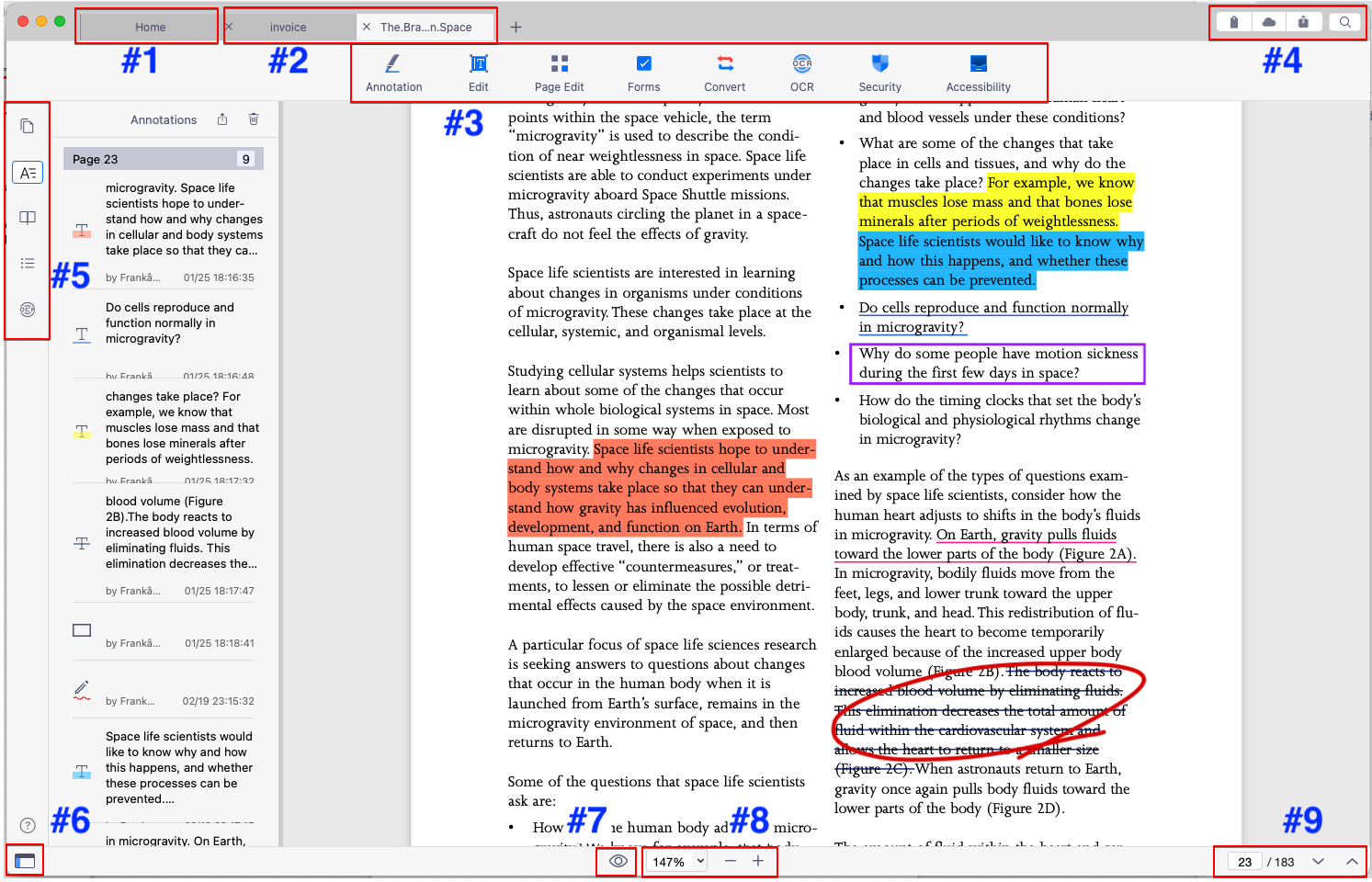
1. Home tab: Click to switch to the Home page.
2. Tabbed Viewing: You can open multiple PDFs as tabs. Each file appears as a tab.
3. Main Toolbar: All essential tools are categorized into 8 main sections, including Annotation, Edit, Page Edit, Forms, Convert, OCR, Security, and Accessibility.
4. Add Tag (for file management), Sync to iCloud/Dropbox, Email out, and Text Search.
5. BOTA & OCR pane: View bookmarks, outline, page thumbnails, annotation list, and the OCR results.
6. Hide/Show the SideBar
7. Viewer Settings: Change the viewer mode and background color
8. Adjust the page width : Zoom In/Out
9. Next Page/Previous Page/Jump to Page
Updated
Comments
0 comments
Please sign in to leave a comment.