You can easily highlight, underline, squiggly and strike-through text within a PDF file.
1. Go to the page where you want to make an annotation.
2. From the annotation toolbar, select the annotation style you want to apply to a section of text. You will enter the annotation mode.
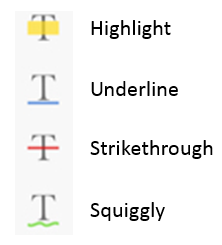
3. Long-tap the icon and you could choose the color and opacity of the annotation.
4. Drag your finger over the text to mark.
5. The text you select will be annotated immediately. Tap the annotation icon again to exit annotation mode.
6. To change the color, opacity, copy, share, add a note or delete the annotation, you can single tap on the annotation and choose your desired action from the pop up menu.
△ Attention: Files within the "Inbox" folder are not allowed to be annotated. Please move the files to other folders to annotate them. △
Updated
Comments
0 comments
Please sign in to leave a comment.